Done in about 1 min(How long it takes to do this in Orchesi)
Away for a while? Set your status to vacation or sick
Away for a few weeks, sick or busy with work? Set your status, and you decline every rehearsal in that period at once.
Where do you use Orchesi?
Going on vacation for three weeks? You don’t need to decline every rehearsal one by one. Your status takes care of it in one go.
Set your status
- Tap your profile photo in the top left.
- Under What’s your status?, tap your current status.
- Choose Vacation, Sick or Work / Study.
- Pick the period under From and Until, and tap Set Status.
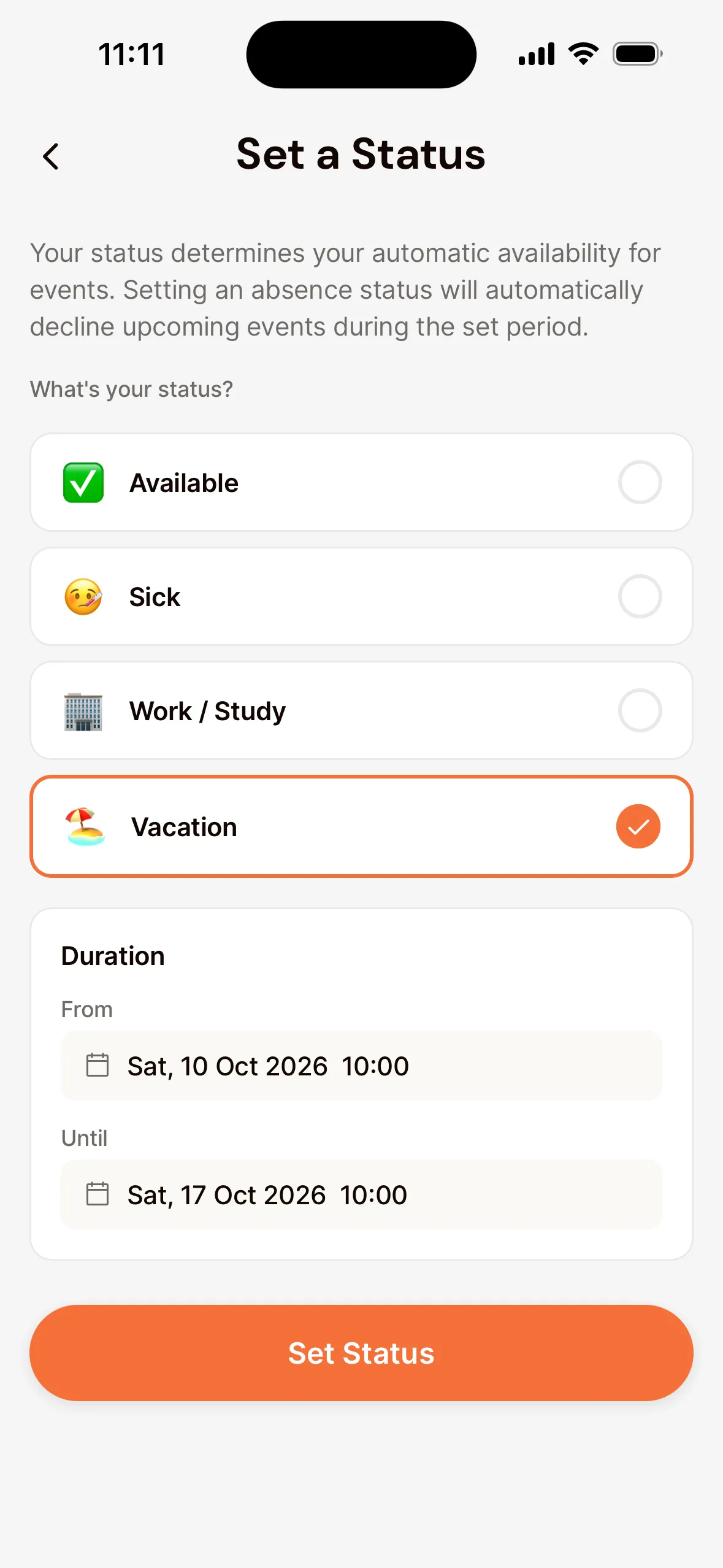
- If there are already events in that period, the app asks whether to decline them. Tap Decline All to decline all of them.
New events in that period are declined automatically too. That way the conductor knows right away you won’t be there.
Back again?
Open your status and tap Clear Status. You’re back to Available. Want to go to a rehearsal during your time away after all? Just sign up for that rehearsal.
Good to know: you set your status in the app. Only using the computer? Then decline per rehearsal in the agenda.
Not in the web app. You can do this in the app.
Last updated:
Did this article help?
Great, thanks for letting us know!
Thanks! We’ll use this to improve the article.
Still stuck?